Did you know that a great app rating is critical for an app’s longevity?
A rating or bad reviews can make or break a user acquisition strategy. We’ve put together some tips to help you manage reviews and generate better app ratings so you can start seeing that MAU count soar.
How to generate better app reviews & ratings
To improve your app review, encourage users to update their review to five stars, or have them leave a positive review from the get go, you need to understand your customers’ pain points and their different emotions when using your app. A good way to do this is by performing customer sentiment analysis. As a result, you’ll be able to effectively address users’ issues and leave them satisfied. Remember, higher satisfaction means a higher likelihood of your app getting positive ratings and reviews.
The ripple effect of higher ratings and reviews is that more people will want to download it and use your product. These ratings are publicly visible to everyone and are a trusted source for users in understanding an app’s credibility and value.
The following tips will help creators excel at user acquisition strategy for apps:
- Improve app quality
If people are happy with your app, they are more likely to write positive reviews. While the opposite is also true if your app has glitches, bugs, and crashes — your users will get frustrated and vent on the app stores by writing bad reviews. Whether users are satisfied with your app will mostly depend on its features and functionalities. You can nearly guarantee that your users will give you a good rating and a favorable review if your app caters to their wants and preferences. On the other hand, if your app isn’t performing sufficiently, you’ll not only see a huge increase in uninstalls, but also a lot of bad reviews. Therefore, when managing your ratings and reviews you should start with your app first. Make sure that your app has no bugs, runs with stability, and contains the features your customers want.
- Provide an outstanding customer experience
Every great app developer understands the importance of stellar CX. However, the user support experience is sometimes left as an afterthought… yikes – that’s a big miss!
Here’s why: when users have a bad customer support experience within an app, it is likely they will uninstall it, download a competitor’s app instead, and potentially leave a public review expressing their dissatisfaction with the service. Those reviews will turn future prospective users off from installing your app and damage your reputation on the app stores. A lower rating will also reduce your visibility on the app stores.
- Request ratings and reviews at the right time
“If you do not ask, you do not get.”
Prompt your users to leave reviews in the app stores! Timing is crucial here…why not ask as soon as they’ve had a positive interaction with your customer support team? If you get 5-star feedback about your support, why not strike at that time of happiness and ask them to express their satisfaction publicly with a review? Likewise, it’s best not to ask for a review when a user is brand new to your app or after they’ve lost a game.
- Keep support in-app
Your support channel should be easy to access and keep users in the app through the entire support journey. You must provide your users with a fast and frictionless path to resolution. You should urge users to contact you if they encounter any bugs or problems with your app. This will help you avoid receiving many negative reviews on public-facing websites, forums, or app stores. Giving consumers the option to contact you first prevents them from venting their frustration on reviews of your app. Your app store product page must also include how to contact your support. It ought to be simple to see and locate.
When users feel heard, they feel happy. When you respond to them, you can do exactly this. Receiving feedback is not enough; you must also respond, whether the customer posted a positive or bad review. For positive evaluations, a simple “thank you” and acknowledgement would be greatly appreciated. If a user leaves a bad review, you may always reassure them that you are investigating their complaint and making constant improvements to your app.
- Thrive to change unfavorable ratings and reviews
Although it’s never nice, it’s not the end of the world if you receive a bad review. You can always influence users to change their bad remarks into favorable ones. For instance, you can reply to your user’s review. Your users will receive a notification each time you reply to one of their messages. Therefore, depending on the action you take, your user may amend their first comment if you can to address and resolve their concern. You have a fantastic opportunity to turn angry customers into grateful ones and they might reconsider their original review.
- Create a Community
By providing users with a community they socialize, make friends, and help each other. Users that spend more time connecting with your community will be more devoted to the brand and spend more time playing your games or in your app.
How to best manage app reviews
App Review Management — best practices
The path to app review excellence
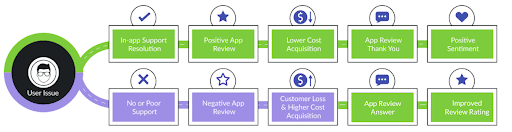
App review management is a great user acquisition strategy. Ideally you want to have your app users contact support in-app as the first line of defense. You want to make it easy for them to reach out to you privately and solve their issues to avoid having them vent on public-facing channels.
If they go on an app store to post reviews about your product or a negative feeling about your company, redirect them to customer support to troubleshoot their issue quickly. This will hopefully rectify their bad review, turning one star into five stars. On average, 40% of users improve review ratings after receiving a response.
What’s the difference between answering a support ticket and an app review?
- For app store review it’s unadvisable to use the same template all the time since messages are public. For private user support, it is possible to use a single template to answer all users without running the risk of damaging the CX.
- App store reviews usually have a maximum message length, the app Store is 5970 characters, and Google Play is 350 characters. This forces brands to communicate differently on each app store.
- When you are in control of how quickly you can reply to your customer tickets, it’s different for each app store. It can take up to 12 hours to post an answer to the user review, so you need to consider that when you try to accelerate your feedback speed. For the app store, it usually takes between 8-12 hours, each message is screened by a moderator before posting. It is however a little faster on Google Play 5-10 minutes.
- You are more constrained in what you can answer in app store reviews:
- Prohibited: emails, links to websites, and other apps.
- Allowed: support email and links to FAQs. This is why we advise redirecting your user to Helpshift FAQs or support pages.
- The app store offers the capability to request a review or a score revision but it has to be done without extra motivation for the user (i.e no freebies for a review)
Why should you bother answering positive reviews?
When you receive positive feedback in reviews, it may appear that leaving it unanswered is acceptable. It’s just as crucial to respond to favorable reviews as it is to grow your app. The importance of customer appreciation in the development of a brand cannot be overstated. A customer who takes the time to offer favorable comments about your product is likely to be very engaged and loyal to your company as long as nothing causes them to feel differently. It’s only natural to reply to their words of encouragement with something equally nice and grateful. You want this satisfied consumer to feel valued and heard, which could lead to other opportunities, such as testimonials or word of mouth.
How you reply to reviews will be scrutinized by app store visitors. Your app page on a review site or app store is like a shop window. They’ll play a role in determining if a customer picks your app over those of competitors. When a customer is evaluating your app, they will want to see how you handle your customers. In fact, according to one study, 89 percent of shoppers examine comments to both good and negative reviews while considering a purchase. Responding to favorable feedback is a simple strategy to persuade future users to buy or download your product.
Trust in your brand raises your customers’ lifetime value. You need to show both happy and unhappy customers that your eyes and ears are on them and that when they leave feedback, you will always respond with helpful comments, now, and in the future and take it into account. This will help you create the kind of trust with your users that will encourage them to stick with your app, boost their lifetime value and provide you with a long-term growth engine. According to a Google study, consumers regard businesses that respond to reviews as 1.7X more trustworthy than those that do not.
Positive feedback could also include suggestions for improving your product or addressing issues. Negative feedback isn’t the only type of input that matters. Raving fans of your product will sometimes leave complaints or insights in their five-star reviews. This is why it’s critical to keep track of and analyze each of them, as well as reply to their feature request or issue promptly on time.
Why must you absolutely answer negative reviews?
Responding to negative reviews is necessary to make unhappy users happy. If you take the initiative to change negative reviews it will lead to a better user experience. According to AppFollow’s research, “users who give 2-3 stars are more willing to increase their rating after receiving your response. The more dissatisfied users our replies help, the higher our rating and conversion will be.”
The best strategy to answer user reviews
How should you form a good user review strategy and answer feedback without making things worse for your brand? Read this to learn how to form a successful user review response strategy.
How to deal with offensive, abusive, or spammy reviews
Store reviews containing offensive, abusive, or spammy material should not be left untackled. Not only do they cause damage to your app’s online reputation, but they also violate the app store and Google Play Policy. It can improve your app’s average rating significantly and help protect your online brand reputation. Learn more here.
Report reviews that include offensive content or spam. Apple provides app owners with the option to report users to ensure that the system is fair, particularly when the user’s review contains spam, offensive material, or other content that may have violated Apple’s Terms and Conditions.
Instead of responding to the review, you may want to use the “Report a Concern” option. This can be seen in the app store Connect’s review area.
How the Helpshift & AppFollow
integration helps improve app ratings
- Agent productivity – Managing app users’ issues from one central dashboard with customer support issues and app reviews will reduce response time, help users faster and increase response rates. It will also make it easier and faster to manage the response process for your agents overall. The AppFollow and Helpshift integration allows you to save time responding to your user reviews. Customer support teams can monitor and respond to reviews left in the app store, Google Play, Mac App Store, Amazon appstore, Amazon marketplace, and Microsoft Store without leaving their Helpshift dashboard.
- Reduce user churn – Users that are dissatisfied with your app will vent or discuss their frustrations on an external community channel. Often, some users, unfortunately, use the review section to air their frustration about a problem not solved or feedback not received or addressed by the developers. If nothing is done to address their concerns and return them to a happier state, they will become a churned user. The good news is that you can help prevent it simply by promptly responding to unhappy users and resolving their issues quickly.
- Improve product quality – Listen to the feedback your users are providing to you and track any trends in customer sentiment so you can resolve problems before they negatively impact more users, reduce your CSAT and impact the adoption of your product. By continuously listening in and improving your app based on your customer feedback you will tailor a product that fits what your customers are expecting and happy with, leading to positive app reviews.
- Boost app reviews – Excellent customer service can help you get more positive app store reviews. You may establish a trustworthy relationship with your users by maintaining frequent contact with them. If you address their problems, you’ll almost always get a positive review. After you’ve rectified their issue, why not send them a push notification or an email to thank them for their input and ask if they’d want to submit another review for the app store?
- Increase UA (User Acquisition) – The impact of a negative rating is very bad in terms of convincing new users to download your app. Competition in app stores is fierce and star ratings could make the difference between your app and one of your competitors. Up to 79% of users check out the app’s review page before deciding to install the app. Customer support and app reviews should be occupying a bigger place at the table of growth strategy and UA. Especially app reviews since they are public and there to stay once they have been published
User acquisition strategies are necessary to ensure that your app continues to grow. One way to ensure this is generating the best app reviews possible. By having many positive app reviews, you’ll encourage more people to download and use your product. It is important to note that to receive positive app reviews you must provide the best customer experience and a product that meets customer expectations.
Take the first step towards improving your user acquisition strategy by download Helpshift’s free Feedback+ SDK right now.